CONTROL TV 100 - Télécommande universelle MELICONI - Notice d'utilisation et mode d'emploi gratuit
Retrouvez gratuitement la notice de l'appareil CONTROL TV 100 MELICONI au format PDF.

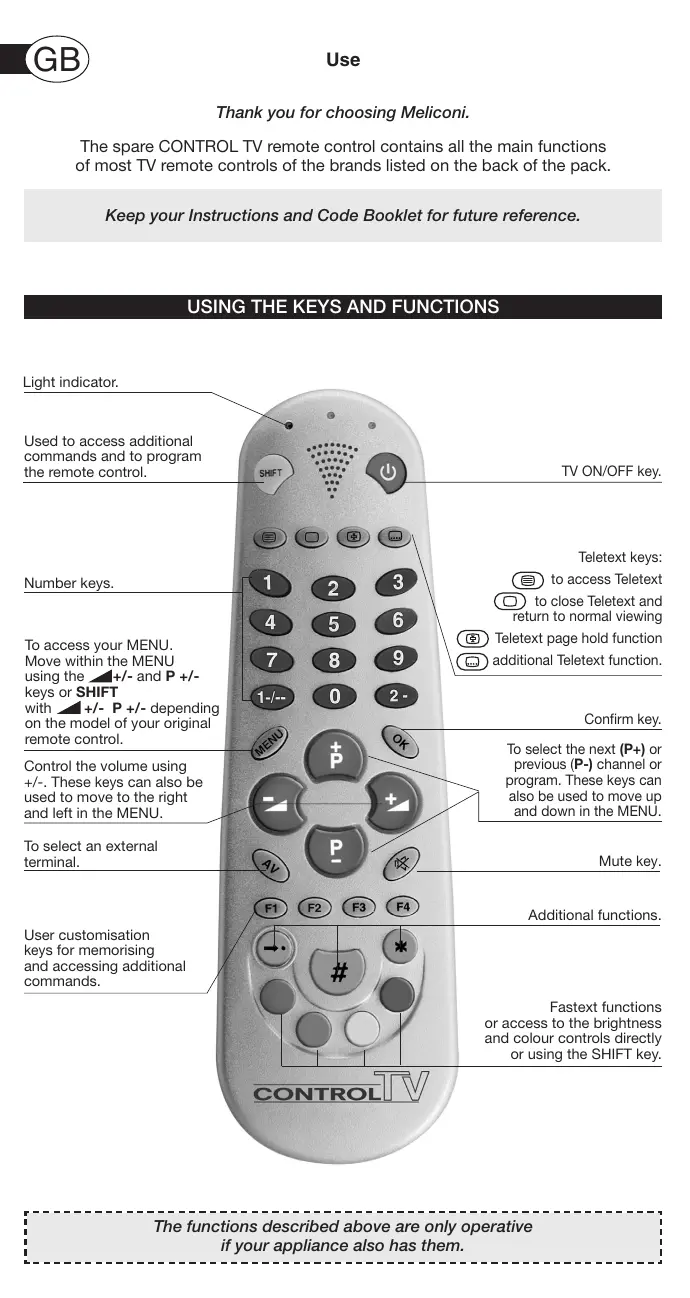

| Type d'appareil | Téléviseur |
| Fonction principale | Contrôle TV universel |
| Touches numériques | Oui, 0 à 9 |
| Touche Marche/Arrêt | Oui |
| Touches Télétexte | Accès, fermeture, fonctions supplémentaires |
| Touches de menu | Accès au menu, navigation avec +/- ou SHIFT |
| Contrôle du volume | Touches +/- pour volume et navigation dans le menu |
| Touches de sélection de chaîne | Touches P+ et P- pour chaînes et navigation dans le menu |
| Touche de confirmation | Oui |
| Touche de sourdine | Oui |
| Touches de personnalisation | 4 touches pour mémorisation et fonctions supplémentaires |
| Touches de fonctions rapides | Contrôle de luminosité et couleur via SHIFT |
| Indicateur lumineux | Oui |
| Compatibilité | Multi-marques TV (non précisé) |
| Alimentation | Non précisé |
| Dimensions | Non précisé |
| Poids | Non précisé |
FOIRE AUX QUESTIONS - CONTROL TV 100 MELICONI
Questions des utilisateurs sur CONTROL TV 100 MELICONI
0 question sur cet appareil. Repondez a celles que vous connaissez ou posez la votre.
Poser une nouvelle question sur cet appareil
Téléchargez la notice de votre Télécommande universelle au format PDF gratuitement ! Retrouvez votre notice CONTROL TV 100 - MELICONI et reprennez votre appareil électronique en main. Sur cette page sont publiés tous les documents nécessaires à l'utilisation de votre appareil CONTROL TV 100 de la marque MELICONI.
MODE D'EMPLOI CONTROL TV 100 MELICONI
Thank you for choosing Meliconi.
The spare CONTROL TV remote control contains all the main functions of most TV remote controls of the brands listed on the back of the pack.
Keep your Instructions and Code Booklet for future reference.
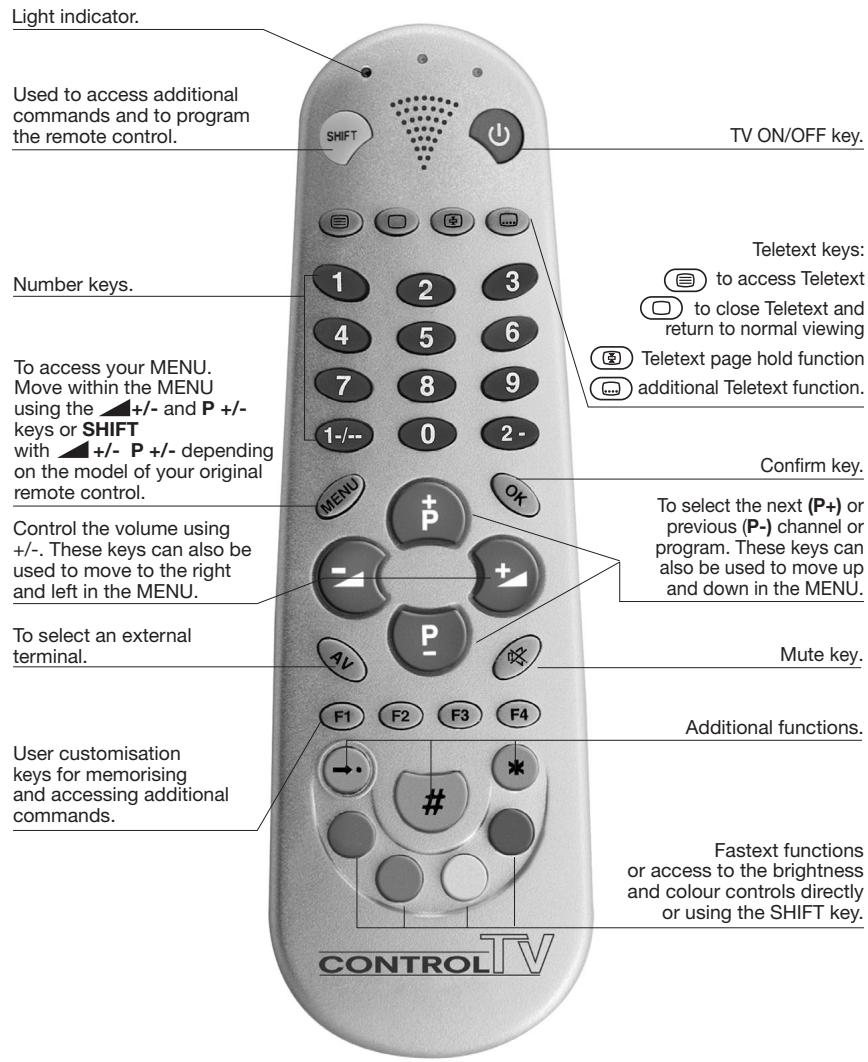
USING THE KEYS AND FUNCTIONS
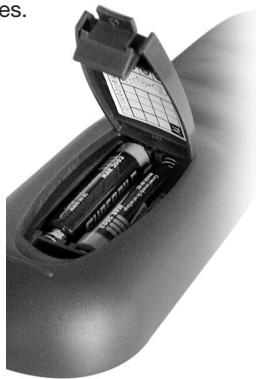
FITTING THE BATTERIES
Before programming and using the remote control, fit the batteries.
The remote control requires 2 new AAA/LR03 alkaline batteries. Insert the batteries as shown.
- The batteries must be changed once a year.
- Change the batteries if the light indicator starts to flash during use, this indicates that the batteries are low and should be changed.
- When you remove the batteries, fit the new ones within 5 minutes or you may have to reprogram your remote control.
- Make a note of the code for your TV on the adhesive label inside the battery cover. This note will be handy if you have to reprogram your control.
SET-UP
Read these instructions carefully before programming your remote control!
To program the CONTROL TV remote control, follow the indications in section A, B or C.
A
BRAND SEARCH PROGRAMMING MODE
- Make sure that the TV is ON.
- In the code book enclosed, look for the brand of your TV and make a note of the code indicated at the side (e.g. Philips 001) or the code for the brand indicated by the arrow.

-
Hold down the SHIFT and ON/OFF keys together until the light indicator at the top starts to flash indicating that the remote control is in programming mode.
-
Release the keys, within 15 seconds, enter the brand code previously identified (e.g. 001). The light indicator flashes more quickly to indicate that the remote control is ready for the search.
- Point the remote control at the TV. Press and release slowly one of the most frequently-used keys several times STOPPING when the appliance responds correctly to the command.

- When the TV responds correctly, press SHIFT to confirm. Three flashes indicate that the operation has been completed correctly.
Additional check
Check that some of the other functions used on your original remote control are working correctly. If the commands function incorrectly or erratically, you have probably entered a code for a similar but different remote control. In this case, repeat the search procedure from point 3.
Identify and make a note of the TV code which you have searched for, following the code noting procedure (see "NOTING THE PROGRAMMED CODE" section).
NOTE: THE LIGHT INDICATOR STOPS FLASHING.
The remote control leaves the programming mode and the light indicator stops flashing:
- if no keys are pressed for 15 seconds
- if an invalid brand code is entered
- if the code search list is completed. In this case, go back to point 3 or switch to programming mode .

DIRECT CODE ENTRY
FOR REMOTE CONTROLS VERSIONS FROM V1 TO V4
- Make sure that the TV is ON.
- In the code book enclosed, look for the brand of your TV and make a note of the first code indicated BENEATH the brand previously identified (e.g. Philips 103).
If there is no response or the appliance only responds partially or incorrectly, it is probable that you have used the wrong code. In this case, try the procedure again from point 3.
This time, however, use the NEXT CODE in the list (e.g. 111).

- Hold down the SHIFT and ON/OFF keys together until the light indicator at the top starts to flash indicating that the remote control is in programming mode.
1 4. Release the keys.
Within 15 seconds, enter the code previously identified
(e.g. 103). Three flashes indicate that the code has been saved correctly. If not, try the code entry procedure again from point 3.
Additional check
Point the remote control at the TV. Check that the appliance responds correctly to the commands sent.
Note down the TV code used to program the remote control on the adhesive label inside the battery cover for rapid consultation.
NOTE: THE LIGHT INDICATOR STOPS FLASHING
The remote control leaves the programming mode and the light indicator stops flashing:
- if no keys are pressed for 15 seconds
- if an invalid brand code is entered.

DIRECT CODE ENTRY
FOR REMOTE CONTROLS VERSIONS V5 - V6
- Make sure that the TV is ON.
- In the code book enclosed, look for the brand of your TV and make a note of the first code indicated BENEATH the brand previously identified (e.g. Philips TV 075).
- Hold down the SHIFT and ON/OFF keys together until the light indicator at the top starts to flash indicating that the remote control is in programming mode.

- Release the keys and press the numeric key 8 once. Within the next 15 seconds, key in the three figure code you noted previously (e.g.075).


Three flashes indicate that the code has been saved correctly. If not, try the code entry procedure again from point 3.
Additional check
Point the remote control at the TV. Check that the appliance responds correctly to the commands sent. If there is no response or the appliance only responds partially or incorrectly, it is probable that you have used the wrong code. In this case, try the procedure again from point 3.
This time, however, use the NEXT CODE in the list (e.g. 09
Note down the TV code used to program the remote control on the adhesive label inside the battery cover for rapid consultation.
NOTE: THE LIGHT INDICATOR STOPS FLASHING
The remote control leaves the programming mode and the light indicator stops flashing:
- if no keys are pressed for 15 seconds
- if an invalid brand code is entered.
This operation may take up to about 20 minutes.
- Make sure that the TV is ON.

- Hold down the SHIFT and ON/OFF keys together until the light indicator at the top starts to flash indicating that the remote control is in programming mode.

- Release the keys.

Within 15 seconds, enter the code 000.

The light indicator flashes more quickly to indicate that the remote control is ready for the search.
- Point the remote control at the TV. Press and release slowly one of the most frequently used keys several times STOPPING when the appliance responds correctly to the command.

- When the TV responds correctly, press SHIFT to confirm. Three flashes indicate that the operation has been completed correctly.
Additional check
Check that some of the other functions used on your original remote control are working correctly. If the commands function incorrectly or erratically, you have probably entered a code for a similar but different remote control. In this case, repeat the search procedure from point 2.
Identify and make a note of the TV code which you have searched for, following the code noting procedure (see "NOTING THE PROGRAMMED CODE" section).
NOTE: THE LIGHT INDICATOR STOPS FLASHING.
The remote control leaves the programming mode and the light indicator stops flashing:
- if no keys are pressed for 15 seconds
- if the code search list is completed.
NOTING THE PROGRAMMED CODE
Always write down the 3-digit code for your remote control on the label inside the battery cover after running the search and saving the code. This may be useful if you need to reprogram your remote control in the event of accidental cancellation or when you change used batteries. If you forget to write down the code or use the remote control programming procedures A or C ... don't worry!
To find the code for your remote control:

- Hold down the SHIFT and ON/OFF keys together until the light indicator at the top starts to flash.

- Release the SHIFT and ON/OFF keys and then press and release the 1--key.
- After a few seconds, the light indicator communicates the code you are looking for by flashing the three numbers separately.
Count the number of flashes for each code number.
For example, for the code 306, the key flashes three, zero and six times to give:
$$ \begin{array}{l} - \dot {\Phi} \dot {\Phi} \dot {\Phi} - = 3 \ - \Phi \Phi \Phi \Phi \Phi \Phi \Phi \Phi \Phi \Phi \Phi - = 0 \ - \Phi \Phi \Phi \Phi \Phi \Phi - = 6 \ \end{array} $$
- Note this code on the label inside the battery cover for rapid consultation.
USING THE ADDITIONAL COMMANDS WHICH DO NOT
APPEAR ON THE KEYPAD
Although not indicated on the keypad, some keys can be used for additional commands.
- Use your CONTROL TV remote control to find them by pressing the following keys one by one:

MENU

OK

AV

→


*
- The most frequently used additional commands like MENU SCROLL - COLOUR - BRIGHTNESS and NORMALISATION are located as follows:
normalisation

menu (up)
menu (down)
menu(right)
menu (left)


menu (up)
menu (down)
menu(right)
menu (left)


brightness (-)


red

yellow

brightness (-)
brightness (+)
color(-)
color (+)


red
green
yellow
blue
- FOR THE LESSER-USED FUNCTIONS, refer to the code book appendix.
Find the symbol table corresponding to the code you saved to program the remote control.
Locate the additional function you require and note down the symbol or number which
appears below it. EXAMPLE: XXX CODE TABLE
Original remote control
additional functions
CONTROL symbols or numbers
| XXX | REV RIV | TUPO TIME | CANCEL ORA | - - - + | - - + | - - + | TP OFF MEM F | TP ON MEM | FULL TOT | EXP TOP | EXP BOT | ALTO I-II | |||
| ★ | MENU | MENU | ▲ ▲ | ■ | ■ ▲ | ▲ ▲ | ●015 | ▲014 | ▲014 | ●015 | AV | 027 | 028 | 027 | |
| MIX | 10 | 11 | ◇ ▼ | ||||||||||||
| 030 | 058 | 059 | ▲ ▲ | ||||||||||||
There are 4 ways to enable the additional commands:
A - TV function example:
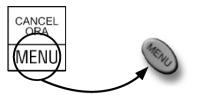
(a-CANCEL ORA)
A symbol appears beneath the function. a) The symbol is on your remote control.
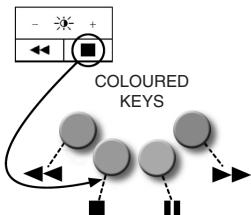
(b - brightness +)
The symbol is not on your remote control.
b) Find it as indicated in the drawing. Every symbol is allocated a colour key.
Press the key to transmit the function to the TV. The command stops when you release the key.
B - TV function example:
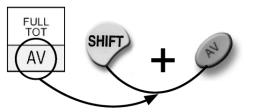
(a-FULLTOT)
A symbol against a grey background appears beneath the function.
a) The symbol is on your remote control.
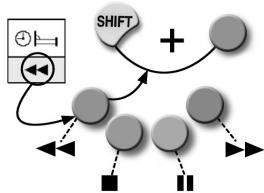
(b - sleep)
The symbol is not on your remote control. b) Find it as indicated in the drawing.
Press SHIFT and the key at the same time. The corresponding function is transmitted to the TV and stops when you release the key.
C - TV function example:
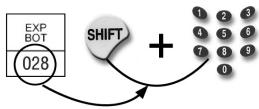
EXP BOT
A number appears beneath the function (028). Press and hold down SHIFT.
Type in the number, holding down the last digit (8).
The function is transmitted to the TV and stops when you release the two keys (SHIFT+ 8).
D - TV function example:
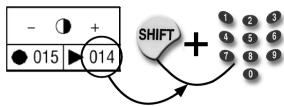
contrast +
Both a symbol and a number are displayed beneath the function. You can apply the command using either the symbol or the number.
If the symbol is not on the remote control, use the number following the example C above.
NOTE:
You cannot use the additional commands unless these were already available on your original remote control.
PROGRAMMABLE KEYS
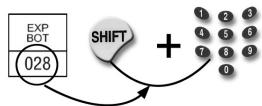


You can customise your remote control to use any 4 additional TV functions, using the function keys
F1-F2-F3-F4.
In the symbol table corresponding to your remote control code, locate the additional function you require and note down the number which appears below it. Note that only number functions can be saved using F1- F2 - F3 - F4.
The function programming procedure is as follows:
TV function example: EXP BOT
Press and hold down SHIFT and type in the number written beneath function (028). Press one of the function keys (e.g. F1) and hold it down together with SHIFT.
After a few seconds, the light indicator will emit a series of 3 flashes to indicate that the function has been saved correctly. Release SHIFT and F1.
From now on, whenever you press F1, the additional command just saved is transmitted to the appliance and stops when F1 is released.
NOTE: If the light indicator does not flash, repeat the saving procedure described above.
TROUBLESHOOTING
PROBLEM
The TV does not respond and the light indicator does not light up when you press a key.
The TV does not respond but the light indicator lights up.
The light indicator flashes.
The remote control commands are not all working correctly.
The brand for your TV is not listed in the Code Book.
SOLUTION
Try some of the other frequently used keys. If the problem persists, check that the batteries are fitted correctly. If necessary replace them with 2 new 1.5 V AAA/LR03 alkaline batteries.
Check that the batteries are new and that the remote control is pointing at the appliance without any obstacles in the way. If required, reset the remote control code, following the programming procedure A or B or C.
The batteries are low. Change them.
You may have used the wrong code. Reset the remote control code, following the programming procedure A or B or C.
Set the remote control code, following the global search, programming procedure C.
INFO-LINE
If you have any queries about CONTROL TV:
- read this booklet carefully; this will help you to solve almost all problems
- consult our Internet site www.meliconi.com to answer all your queries more easily and quickly.
WARRANTY: 2 years
Tampering or improper product use will void this guarantee.
Remote control model
CONTROL TV
Purchase date
Agent's stamp